Introduction
An applicant tracking system (ATS), also known as an application tracking system, has become fundamental infrastructure for modern recruitment teams. Whether you’re a HR professional managing your first hiring process or a large enterprise with thousands of annual hires, understanding what an ATS is and how to leverage it effectively can transform your recruitment outcomes.
In this comprehensive guide, we’ll explore everything you need to know about ATS software from understanding what ATS means and how it works, to selecting the right ATS for your organization, and implementing it successfully for maximum ROI.
What is an ATS? (Definition & Core Meaning)
ATS Full Form and Definition
ATS stands for “Applicant Tracking System.” It’s also commonly referred to as an “application tracking system” or “automated tracking system” in the recruitment industry.
An applicant tracking system is a specialized software platform designed to automate, streamline, and optimize the entire recruitment lifecycle. At its core, an ATS collects, organizes, stores, and manages all candidate information and applications from initial submission through hire (and often into onboarding).
What Does ATS Mean in Practice?
In practical terms, an ATS system functions as the central nervous system of your recruitment operation. When a candidate applies for a position, the ATS automatically captures their information, parses their resume, and stores it in a searchable database. The ATS meaning extends beyond simple data storage it encompasses workflow automation, collaboration tools, analytics, and integration capabilities that enable modern recruiting.
How Applicant Tracking Systems Work
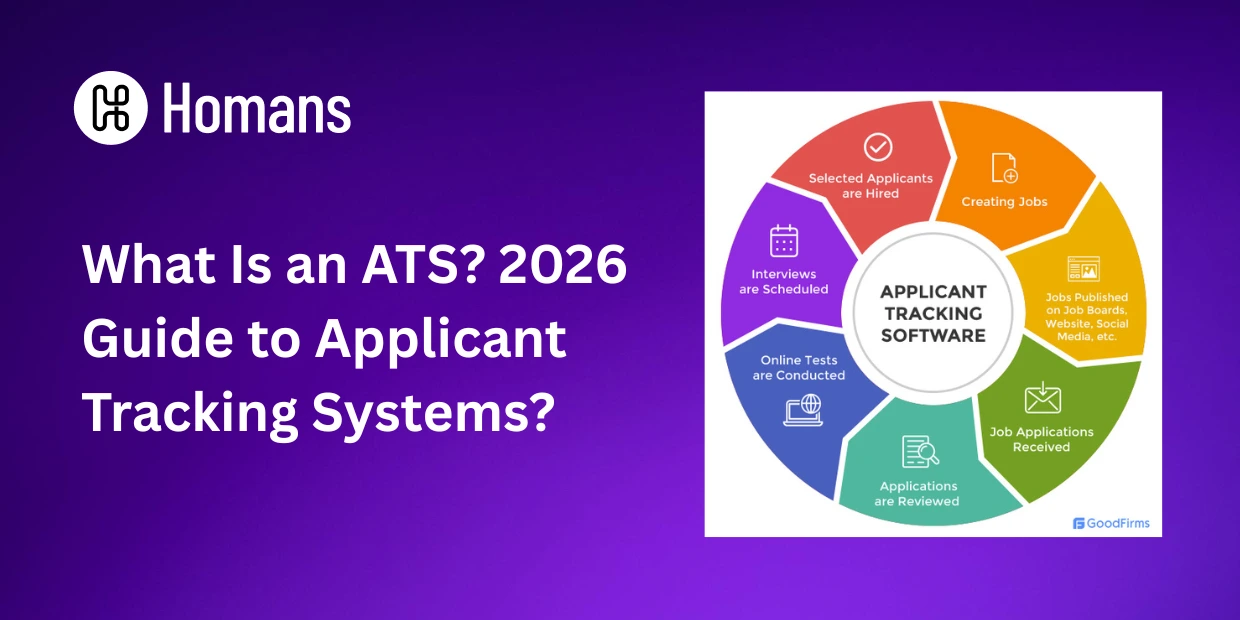
The Complete ATS Workflow
1. Job Posting and Distribution Your ATS system manages the creation and posting of job descriptions across multiple channels. An ATS software can simultaneously publish to your careers page, job boards (like Indeed, LinkedIn, etc.), and social media platforms, dramatically reducing time-to-post.
2. Application Collection When candidates apply through your ATS tracking system, applications flow directly into a centralized inbox. The ATS automatically captures:
- Resume and cover letter
- Contact information
- Application source (which job board, social platform, etc.)
- Application timestamp
- Custom application form responses
3. Resume Parsing and Data Extraction Modern ATS software uses artificial intelligence to parse resumes and extract key information automatically. This includes education, experience, skills, certifications, and contact details creating structured candidate profiles within seconds.
4. Candidate Database Management Your ATS applicant tracking system maintains a comprehensive candidate database. This searchable talent pool allows recruiters to find qualified candidates for future roles, even months or years after their initial application.
5. Workflow Automation and Routing An automated tracking system automatically routes applications through predefined workflows. For example, applications might automatically move through stages like: Received → Phone Screen → Technical Assessment → Interview → Offer → Hire.
6. Collaboration and Feedback ATS systems provide tools for hiring managers, recruiters, and interviewers to:
- Add notes about candidates
- Rate and score candidates
- Share feedback
- Make collaborative hiring decisions
- Track interview schedules
7. Reporting and Analytics Your ATS tracking system generates detailed reports about your recruitment pipeline, including metrics like time-to-fill, source effectiveness, candidate-to-hire ratios, and more.
What Is an ATS System? Key Features Explained
Core ATS Features All Systems Include
Application Management Every ATS software centralizes all applications in one searchable location. Instead of emails scattered across inboxes, you have a unified view of every candidate for every position.
Candidate Communication ATS systems enable automated and personalized communication with candidates at every stage. Send status updates, request interview confirmation, or provide feedback all within the ATS applicant tracking system.
Screening and Filtering An ATS system can automatically screen candidates against defined criteria (keywords, qualifications, experience level). This reduces manual screening time by 70-80% and helps identify top talent faster.
Pipeline Management Visual pipeline views let you see exactly where each candidate stands in your hiring process. Move candidates between stages, identify bottlenecks, and forecast hiring timelines.
Interview Scheduling Integrated scheduling tools eliminate email back-and-forth. Candidates can book time directly with interviewers, and the ATS system automatically sends reminders to all parties.
Candidate Scoring and Ranking ATS systems can automatically score candidates based on qualifications, application completeness, and interview performance. This objective ranking helps reduce unconscious bias in hiring decisions.
Reporting and Analytics Dashboards show recruitment metrics in real-time. Track KPIs like cost-per-hire, time-to-hire, applicant flow metrics, and source quality analysis.
Why Implement an ATS? Benefits for Modern Recruiters
Operational Efficiency Gains
Time Savings An applicant tracking software reduces manual data entry by 90%. Time spent on administrative tasks drops dramatically, allowing recruiters to focus on relationship-building and strategic hiring.
Error Reduction Manual processes create mistakes missed applications, duplicated candidate records, tracking errors. An ATS automates these processes and eliminates human error in data management.
Scalability Whether you’re hiring 5 or 500 positions annually, an ATS tracking system scales with your needs. The system handles volume that would overwhelm manual processes.
Improved Candidate Experience
Transparent Communication Candidates know where they stand in your process and when to expect next steps. This transparency significantly improves your employer brand.
Faster Response Times Recruiters can identify qualified candidates immediately and reach out quickly. Candidates appreciate swift feedback and interview invitations.
Professional Impression Using an organized ATS system demonstrates professionalism. Candidates have positive experiences applying through your careers portal.
Better Hiring Decisions
Data-Driven Decisions ATS reports reveal which sources produce the best hires, which screening questions are most predictive, and how long different roles typically take to fill. Make hiring decisions based on data, not intuition.
Reduced Bias Structured processes and objective scoring in your ATS system reduce unconscious bias. When everyone follows the same workflow and uses the same criteria, decisions become more equitable.
Access to Talent Pool Your ATS applicant tracking system maintains comprehensive talent records. You can search your database before posting new roles and proactively contact qualified candidates from previous applications.
Compliance and Security
Legal Documentation An ATS system provides complete audit trails of every hiring decision. This documentation is crucial for legal compliance and defending against discrimination claims.
Data Protection Modern ATS software implements enterprise-grade security, encryption, and access controls to protect sensitive candidate information.
GDPR and Privacy Compliance Quality ATS systems include built-in compliance features for GDPR, CCPA, and other privacy regulations.
Types of ATS Software: Choosing the Right System
Enterprise ATS Systems
Enterprise applicant tracking systems like Greenhouse ATS, Workday Recruiting, and SAP SuccessFactors serve large organizations with complex hiring needs.
Characteristics:
- Support for unlimited users and jobs
- Advanced customization and workflow design
- Sophisticated reporting and analytics
- Integration with larger HR ecosystems
- Dedicated support and implementation services
- Higher cost (typically $10,000-$100,000+ annually)
Best for: Enterprise companies, organizations with 500+ employees, complex hiring processes
Mid-Market ATS Platforms
Mid-market ATS software like Lever, iCIMS, and Talentsoft balance functionality with affordability.
Characteristics:
- Scalable to handle 100-5,000+ annual hires
- Strong user interface and ease of use
- Good integration library
- Reasonable pricing ($3,000-$15,000 annually)
- Responsive customer support
Best for: Growing companies (50-500 employees), rapidly scaling organizations
Small Business and Startup ATS
Budget-friendly ATS solutions like Breezy HR, JazzHR, and SmartRecruiters serve smaller organizations.
Characteristics:
- Lower cost ($500-$3,000 annually)
- User-friendly interface focused on simplicity
- Essential features without unnecessary complexity
- Good for companies with 1-20 annual hires
- Limited customization
Best for: Startups, small businesses, organizations with simple hiring needs
Specialized and Niche ATS Platforms
Some ATS software targets specific industries:
- Tech recruitment: Lever, Workable
- Healthcare: Cornerstone, HealthcareSource
- Higher Education: Interfolio, CRM systems specialized for academic hiring
- Retail: Toast, 7shifts (focused on hourly hiring)
Key Evaluation Criteria: What to Look for in an ATS
1. Ease of Use (Usability)
Your ATS system will be used by recruiters, hiring managers, interviewers, candidates, and possibly onboarding teams. The interface must be intuitive for all user types.
Evaluate:
- How quickly can a new user learn the system?
- Is the candidate application experience smooth?
- Can hiring managers use it without training?
- Does the mobile experience work well?
2. Job Posting and Distribution
An effective applicant tracking system publishes jobs to multiple channels automatically.
Look for:
- Integration with major job boards (Indeed, LinkedIn, Glassdoor, ZipRecruiter)
- Social media posting capabilities
- Custom careers page hosting
- Real-time application flow to your system
3. Resume Parsing and Candidate Screening
Resume parsing quality separates excellent ATS software from mediocre systems.
Consider:
- Accuracy of resume parsing (test with real resumes)
- Skill extraction capabilities
- Ability to create custom screening questions
- Automated candidate scoring and ranking
- Keyword search functionality across candidate database
4. Workflow Customization
Every organization has unique hiring workflows. Your ATS system should accommodate your process, not force you to change yours.
Assess:
- Can you create custom pipeline stages?
- Can you define different workflows for different job types?
- How easy is it to modify stages?
- Can non-technical users customize workflows?
5. Communication and Collaboration
An applicant tracking system should facilitate seamless team communication.
Evaluate:
- Can all stakeholders leave notes and feedback?
- Does the system support task assignments?
- Are there email notifications and alerts?
- Can you send bulk communications to candidates?
- Is there a mobile app for on-the-go access?
6. Interview Management and Assessment
Strong interview features in your ATS software streamline the assessment process.
Look for:
- Interview scheduling within the system
- Scorecard templates for consistent evaluation
- Video interview integration (if needed)
- Assessment tool integration
- Interview feedback collection from all evaluators
7. Integrations with Other Tools
Modern ATS software should integrate with your existing tech stack.
Check compatibility with:
- Background check providers (Sterling, Checkr)
- Video interviewing platforms (Spark Hire, Prescreen)
- Assessment tools (Codility, Pymetrics)
- Offer letter software
- Onboarding platforms
- Calendar and scheduling tools
- HRIS and payroll systems
8. Reporting and Analytics
Reporting capabilities vary significantly between ATS systems. Evaluate what metrics matter to your organization.
Essential reports include:
- Time-to-hire by role, stage, and source
- Cost-per-hire analysis
- Source effectiveness (which channels produce the best hires)
- Pipeline velocity and bottleneck identification
- Demographic reporting (for compliance)
- Offer acceptance rates
- Custom report building
9. Data Security and Compliance
Your ATS system handles sensitive candidate information. Security is non-negotiable.
Verify:
- SOC 2 Type II certification
- Data encryption (in transit and at rest)
- Regular security audits
- GDPR, CCPA, and local privacy compliance
- User access controls and audit logs
- Data backup and disaster recovery
10. Implementation and Support
Deploying a new ATS applicant tracking system impacts your entire recruitment process. Quality implementation support is valuable.
Consider:
- Onboarding and training provided
- Data migration assistance
- Dedicated implementation specialist
- Documentation and knowledge base
- Training for different user types
- Ongoing customer success support
11. Pricing and ROI
ATS costs vary from hundreds to hundreds of thousands annually. Understand the full cost structure.
Compare:
- Pricing model (per-user, per-hire, flat rate, usage-based)
- Cost at your current hiring volume and projected growth
- What’s included vs. add-on costs
- Contract flexibility
- Implementation costs
- Calculate ROI based on time saved and improved quality
How to Select the Best ATS for Your Organization
Step 1: Define Your Requirements
Before evaluating systems, clarify your needs:
- How many positions do you hire for annually?
- What hiring workflows and stages do you need?
- Which integrations are must-haves?
- What’s your budget?
- Who are your users (recruiters, hiring managers, candidates)?
- Do you need industry-specific features?
Step 2: Create a Shortlist
Research ATS software options that meet your core requirements. Read independent reviews on G2, Capterra, and TrustRadius. Ask for peer recommendations.
Step 3: Request Demos
Don’t just watch vendor demos actively use the system during trials. Have key stakeholders test the interface and workflows.
During demos, specifically ask about:
- How the system handles your unique processes
- Resume parsing quality
- Reporting capabilities
- Integration setup
- Implementation timeline
Step 4: Conduct a Paid Pilot
Before committing long-term, run a 30-60 day pilot with real recruitment processes. This reveals how the ATS performs in your environment.
Step 5: Compare Total Cost of Ownership
Calculate complete costs including software, implementation, training, and any custom development needed.
Step 6: Make Your Decision
Weight factors like ease of use, features, cost, and implementation support. Often the “perfect” ATS is the one you’ll actually use effectively.
ATS Best Practices for Maximum Effectiveness
1. Invest in Implementation and Training
Don’t just deploy your ATS system and hope people figure it out. Proper implementation includes:
- Detailed configuration of your workflows and processes
- Customization of fields and forms
- Integration setup
- Comprehensive training for all users
- Documentation specific to your organization
- Ongoing support for new team members
2. Maintain Data Quality
Garbage in, garbage out. Quality ATS insights depend on good data practices.
Ensure:
- Consistent naming conventions
- Complete candidate information
- Regular database cleaning (remove duplicates)
- Proper documentation of hiring decisions
- Regular review of custom fields and their necessity
3. Customize Your Workflows
Use the ATS system to enforce your best practices:
- Define required stages for consistency
- Set up approval workflows for offers
- Create stage-specific tasks (phone screen checklist, interview prep, etc.)
- Automate routine communications
4. Leverage Candidate Scoring
If your ATS software supports it, create scoring models that predict success in your roles:
- Identify which qualifications matter most
- Test models against past hires
- Refine based on hiring outcomes
- Use scoring to reduce unconscious bias
5. Mine Your Data
Extract insights from your ATS reporting:
- Which job sources produce the best candidates?
- Where do candidates drop out of your pipeline?
- How long does each stage typically take?
- Which screening questions predict success?
- What’s your offer acceptance rate by source?
Use these insights to continuously improve your recruiting.
6. Maintain Candidate Communication
Don’t let candidates languish in your ATS system without updates:
- Send regular status updates
- Reject candidates promptly with constructive feedback
- Keep candidates engaged if they’re in pipeline
- Use the system to maintain a talent pool for future roles
7. Integrate with Your Broader Hiring Strategy
Your ATS system should support (not dictate) your hiring approach:
- Does it support structured interviews? Implement them.
- Can it track diversity metrics? Monitor and report on them.
- Does it integrate with assessments? Use them appropriately.
- Can it track hiring manager satisfaction? Use it to improve processes.
ATS System Challenges and How to Overcome Them
Challenge 1: Low Adoption Rates
Users resist new systems, especially if they disrupt established processes.
Solutions:
- Involve key users in ATS selection
- Provide comprehensive training
- Start with simple use cases and expand gradually
- Celebrate early wins and share success stories
- Assign a “champion” in each department for peer support
Challenge 2: Poor Data Quality
Inconsistent or incomplete data ruins ATS reporting and decision-making.
Solutions:
- Establish data entry standards and best practices
- Make key fields required
- Regular data cleanup projects
- Train users on the importance of data quality
- Automate data capture where possible
Challenge 3: Underutilized Features
Many organizations use only 20% of their ATS system’s capabilities.
Solutions:
- Conduct feature usage audits
- Provide training on underused but valuable features
- Create use cases and best practice documentation
- Assign “feature owners” to champion adoption
- Regularly revisit vendor training materials
Challenge 4: Integration Gaps
ATS systems that don’t integrate smoothly create manual workarounds.
Solutions:
- Prioritize integration requirements during selection
- Invest in proper integration setup during implementation
- Use middleware if native integrations don’t exist
- Regularly review integration effectiveness
- Plan for new integrations as your stack evolves
Challenge 5: Compliance and Privacy Concerns
Candidate privacy regulations are increasingly complex.
Solutions:
- Ensure your ATS vendor stays current on compliance
- Implement strong access controls
- Regular audits of data practices
- Clear candidate data retention policies
- Proper handling of candidate consent and opt-outs
The Future of ATS Technology
AI and Automation Advances
Modern ATS software increasingly uses AI to:
- Automatically screen candidates against multiple criteria
- Predict which candidates will succeed in roles
- Generate interview questions and feedback summaries
- Identify top talent across your database proactively
- Detect and mitigate unconscious bias
Enhanced Candidate Experience
The ATS landscape is shifting toward:
- Mobile-first application experiences
- One-click applications from social media
- Video interviewing built into the platform
- Real-time interview feedback to candidates
- Seamless transition from ATS to onboarding
Integration and Ecosystem Expansion
Next-generation ATS software increasingly connects to:
- Talent intelligence platforms
- Skills development and upskilling tools
- Employee referral programs
- Internal mobility platforms
- Workforce planning tools
Focus on Diversity, Equity, and Inclusion
Modern ATS systems are adding features to:
- Remove identifying information during screening
- Monitor hiring outcomes by demographic group
- Reduce bias in candidate scoring
- Report on diversity metrics
- Support inclusive hiring practices
Comparing ATS Meaning Across Different Contexts
Depending on where you encounter the term “ATS,” it might refer to slightly different things:
- ATS as software: The applicant tracking system platform you purchase and implement
- ATS as a process: The workflow and methodology your organization uses to track candidates
- ATS as functionality: Specific features within broader HRIS platforms
- ATS in recruitment conversations: Often used as shorthand for the entire hiring automation process
Understanding context helps ensure you’re discussing the same thing when talking about ATS meaning with vendors, colleagues, and hiring managers.
Glossary: ATS-Related Terms
Applicant Tracking System (ATS): Software that manages the recruitment process from job posting through hire
Application Tracking System: Alternative name for ATS, emphasizing the application management aspect
Automated Tracking System: Emphasizes the automation capabilities of ATS software
ATS Software: The technology platform delivering applicant tracking capabilities
ATS System: The complete system including hardware, software, data, and processes
ATS Tracking System: Emphasizes the system’s ability to track candidates through hiring pipeline
ATS Meaning: The definition and purpose of applicant tracking systems
ATS Full Form: Refers to what the acronym “ATS” stands for (Applicant Tracking System)
ATS Meaning in Recruitment: How the term is used within the HR and recruitment industry
Conclusion
An applicant tracking system has evolved from a nice-to-have to an essential tool for modern talent acquisition. Whether you’re implementing your first ATS software or replacing an existing system, understanding what an ATS is, how it works, and how to use it effectively directly impacts your recruitment success.
The right applicant tracking system streamlines your hiring process, improves candidate experience, reduces costs, and helps you build more diverse and effective teams. Whether you’re evaluating what ATS means for your small business or implementing enterprise-scale recruiting infrastructure, the principles remain the same: focus on efficiency, quality, data-driven decisions, and compliance.
Take time to properly select, implement, and optimize your ATS system. The investment in getting this right pays dividends through faster hiring, better placements, improved candidate experience, and more strategic talent acquisition.
Next Steps
- If you’re new to ATS: Start by understanding your organization’s hiring needs and challenges. Document your current process before evaluating software solutions.
- If you’re evaluating ATS options: Request demos from at least 3-5 top contenders. Run a 30-day pilot before making a final decision.
- If you have an ATS but aren’t getting value: Audit current usage, identify underutilized features, and invest in training and optimization.
- If you’re implementing a new ATS: Invest in proper implementation and change management. Success with applicant tracking systems depends more on execution than software selection.